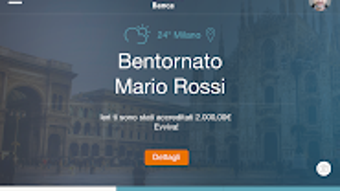

Download BPER Banca per tablet – personal banking assistant, tablet banking, secure banking, financial management, QR code payments, investment tracking
Overview
BPER Banca per tablet is a specialized desktop-like application developed by Gruppo BPER for users who prefer managing their finances on a tablet device. Designed specifically for customers of Gruppo BPER Banca and Banco di Sardegna, the app functions as a personal banking assistant, streamlining financial tasks through intuitive navigation and intelligent suggestions. Its primary purpose is to simplify daily banking operations such as checking account balances, reviewing transaction history, transferring funds, and paying bills—all optimized for the larger screen of a tablet.
The app supports features like customizable menus, quick access to account details, and reminders for upcoming financial deadlines. It enables users to perform secure transactions using the "Recupera dati" and "Rubrica" functions, and facilitates bill payments via QR code or barcode scanning. While the app is tailored for tablet use, it is not compatible with smartphones, which have a separate application named Smart Banking per smartphone.
The software is available exclusively in Italian and is distributed directly through the official website of Gruppo BPER Banca, rather than through the Google Play Store. This targeted distribution ensures secure access for verified customers only.
Key Features & Capabilities
- Personal Banking Assistant: Learns from user navigation patterns to offer personalized suggestions for faster access to frequently used functions.
- Customizable Menu: Allows users to tailor the interface to prioritize their most-used banking actions, improving workflow efficiency.
- Account & Transaction Management: Centralized dashboard for viewing balances, transaction history, and available credit across all linked accounts.
- Quick Transfers: Supports fast fund transfers using the "Recupera dati" and "Rubrica" functions, reducing steps in the transfer process.
- Bill Payments via QR/Barcode: Enables users to pay bills instantly by scanning QR codes or barcodes, enhancing convenience and speed.
- Card Management: Provides tools to monitor and manage physical and digital cards, including status tracking and quick recharges for prepaid cards.
- Investment Tracking: Offers visual performance graphs to monitor the growth and status of investment portfolios.
- Reminder System: Allows users to set alerts for recurring payments, due dates, or other financial milestones.
These features are designed to reduce friction in daily banking tasks, particularly for users who prefer the larger screen and enhanced usability of a tablet. The app’s ability to learn from user behavior enhances long-term usability, making it increasingly efficient over time. For example, frequent transfer users can benefit from the streamlined "Recupera dati" function, while investors can leverage the graphical insights to monitor performance without switching apps.
User Interface, Workflow & Performance
The user interface of BPER Banca per tablet is optimized for tablet screens, offering a clean layout with intuitive navigation. Menus are structured to support touch-based interaction, with large, clearly labeled icons and accessible sections for core banking functions. The customizable menu allows users to reorder or hide elements based on personal preference, improving accessibility and reducing clutter.
Workflow efficiency is enhanced by the app’s adaptive nature—repeated actions are prioritized, and suggestions are dynamically updated based on usage patterns. While specific performance data such as CPU or RAM consumption was not provided, the app is designed to operate smoothly on modern tablets with stable internet connectivity. The developer did not specify resource usage details.
Stability appears to be maintained through regular updates, which include bug fixes and feature enhancements. As the app is not available on the Google Play Store, users must download it directly from the official website, which may contribute to a more controlled update environment. Overall, the interface prioritizes clarity and ease of use, making it suitable for users of varying technical proficiency.
Compatibility & System Requirements
BPER Banca per tablet is designed for Android tablets and is not compatible with smartphones. The app is available exclusively to customers of Gruppo BPER Banca and Banco di Sardegna. The developer did not provide detailed system requirements, including minimum processor speed, RAM, or storage space.
Installation size was not specified. Platform compatibility information is limited to Android tablets, with no mention of support for iOS or other operating systems. The app is not available in the Google Play Store, requiring users to download it directly from the official website of Gruppo BPER Banca.
This approach ensures that only authorized users can access the software, enhancing security. Users should verify their eligibility before attempting to install the app. The developer did not specify whether older tablet models are supported or if specific Android versions are required.
Pros and Cons
Pros
- Optimized for tablet use with a large-screen-friendly interface
- Personalized suggestions based on user behavior improve efficiency
- Secure access for verified bank customers only
- Supports QR and barcode payments for quick bill settlements
- Investment performance graphs provide visual financial insights
- Customizable dashboard enhances user control
- Regular updates ensure ongoing improvements and security patches
Cons
- Not compatible with smartphones; separate app required for mobile users
- Available only to customers of Gruppo BPER Banca and Banco di Sardegna
- Not available on Google Play Store; must be downloaded from official website
- Language restricted to Italian
- Exact system requirements and performance metrics not disclosed
FAQ Section
Is BPER Banca per tablet available for smartphones?
No. The app is specifically designed for Android tablets and is not compatible with smartphones. Smartphone users should use the dedicated Smart Banking per smartphone application.
How can I download BPER Banca per tablet?
The app is not available on the Google Play Store. It must be downloaded directly from the official website of Gruppo BPER Banca. Only customers of Gruppo BPER Banca or Banco di Sardegna can access the download link.
Is the app secure?
Yes. The app is restricted to verified bank customers and requires authentication via a Smart PIN created through the smartphone app. This ensures a secure connection to banking services.
Can I use BPER Banca per tablet without a smartphone?
No. To access the app, users must first download the Smart Banking per smartphone app and create a Smart PIN. The tablet app relies on this authentication method for secure access.
Are there regular updates for the app?
Yes. The app is updated regularly with new features, improvements, and security enhancements. Updates are distributed through the official website.
Final Thoughts + CTA
BPER Banca per tablet stands out as a purpose-built financial tool for customers who value a streamlined, tablet-optimized banking experience. Its intelligent interface, customizable layout, and support for QR-based payments make it a powerful utility for managing finances on larger screens. While its exclusivity to specific bank customers and lack of public availability on app stores may limit broader access, it delivers a secure and efficient solution for its target audience.
The integration of investment tracking and smart reminders adds depth, making it more than just a transactional tool. For users who prefer the convenience of a tablet for banking, this app offers a compelling alternative to traditional desktop banking. If you're a customer of Gruppo BPER Banca or Banco di Sardegna and own an Android tablet, this app is a valuable addition to your digital finance toolkit.
Download BPER Banca per tablet now.






.png)
